Is My iPhone Screen Original? How to Tell in 5 Minutes
Short answer: on iPhone 11 and later (except iPhone SE), open Settings → General → About. If there's no Parts and Service History section, Apple has no record of the display being replaced. If there is one, the label next to Display gives Apple's verdict: Genuine, Used, Unknown or Finish Repair. Then do the two-minute True Tone and touch tests below, because some aftermarket screens show up in how the phone behaves.
Step 1: Read Parts and Service History
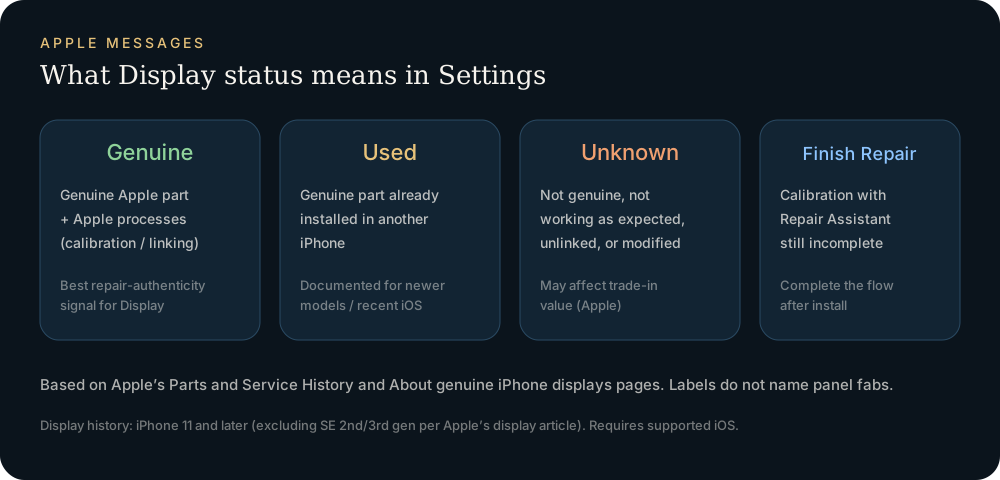
Go to Settings → General → About and scroll past the storage and model numbers. Apple explains the labels in About genuine iPhone displays:
| What you see next to Display | What it means | Is the screen original? |
|---|---|---|
| No Parts and Service History section | No recorded repair | Most likely the factory screen |
| Genuine | Replaced with a new Apple display, repair finished with Apple's process | Replaced, but a genuine part |
| Used (iPhone 15 and later, iOS 18+) | Genuine Apple display taken from another iPhone | Replaced, genuine but second-hand |
| Finish Repair | New Apple display installed, but Repair Assistant not yet run | Replaced, genuine, calibration pending |
| Unknown | Not genuine, not working as expected, not linked after repair, or modified | Treat as aftermarket until proven otherwise |
Two limits. First, only the most recent service is shown. Second, on iOS 15.1 or earlier you'll see an "Important Display Message" instead of Unknown. Tap the Display row for the service date when the phone is online.
Step 2: Test True Tone, brightness and touch
Apple lists the symptoms a nongenuine display can cause. Each one can be checked in about a minute:
- True Tone: open Settings → Display & Brightness. If the True Tone toggle is missing or does nothing when you move from daylight to a warm lamp, that's a red flag.
- Ambient light sensor: turn on Auto-Brightness (Settings → Accessibility → Display & Text Size) and cover the top edge with your hand. The screen should dim within a few seconds.
- Touch: open Notes and drag one finger slowly across every edge and corner. Look for dead zones and jumps.
- Proximity: during a call, the screen should turn off when held to your ear.
- Color and uniformity: a full-screen white or gray image shows yellow or blue casts and uneven brightness. The lookup report has a built-in screen test with solid colors for this.
None of these proves a screen is genuine. Failing several of them on a phone with an Unknown label points strongly to an aftermarket panel.
Step 3: Check the panel code
A genuine Apple display still comes from one of three makers: Samsung, LG or BOE. The first three characters of raw-panel-serial-number identify which, and many aftermarket panels don't carry a valid code. See Who made my iPhone screen? for how to read it and the prefix table.
Model limits
| Model | Display history in Settings |
|---|---|
| iPhone 11 and later (not SE) | Yes |
| iPhone SE (2nd/3rd gen), XR, XS | No display row (battery only) |
| iPhone X and earlier | No Parts and Service History |
On models without a display row, Steps 2 and 3 plus a physical inspection are all you have: look for uneven gaps, lifted edges, mismatched glass color and missing screws at the bottom edge.
Buying used: the 60-second script
- Ask the seller to open Settings → General → About while you watch, or send a screen recording that starts on the home screen.
- Ask for the Display label and the service date.
- Check that True Tone is available.
- If the label is Unknown, price the phone as having an aftermarket screen. Apple notes it can lower trade-in value.
FAQ
Does "Genuine" mean the screen was never replaced?
No. Genuine only appears after a repair. A phone that never had its screen replaced shows no Parts and Service History entry for Display at all.
Will an Unknown screen stop working?
Apple says these messages don't affect your ability to use the iPhone. Touch, brightness or True Tone problems can still come from the part itself.
Can I clear the Unknown label?
Only by installing a genuine Apple display and finishing the repair with Apple's process (Repair Assistant).
Import a sysdiagnose file to see the display, battery, camera, storage, memory and baseband makers in one report. Lookups use a paid quota.
Open the lookup tool