Qualcomm or Intel Modem? How to Check Your iPhone Baseband
Short answer: For most iPhones the model tells you the modem. iPhone XS, XR and 11 use Intel. iPhone 12 through 16 and the iPhone 17 line use Qualcomm. iPhone 16e and iPhone Air use Apple's own C1 and C1X. Only the iPhone 7, 8 and X were sold with either a Qualcomm or an Intel modem, depending on the Model Number. Settings shows a Modem Firmware version but never the chip vendor. To read the modem straight from your own phone, use the baseband chip ID in a sysdiagnose. Our lookup shows it as Baseband vendor.
What "baseband" means on an iPhone
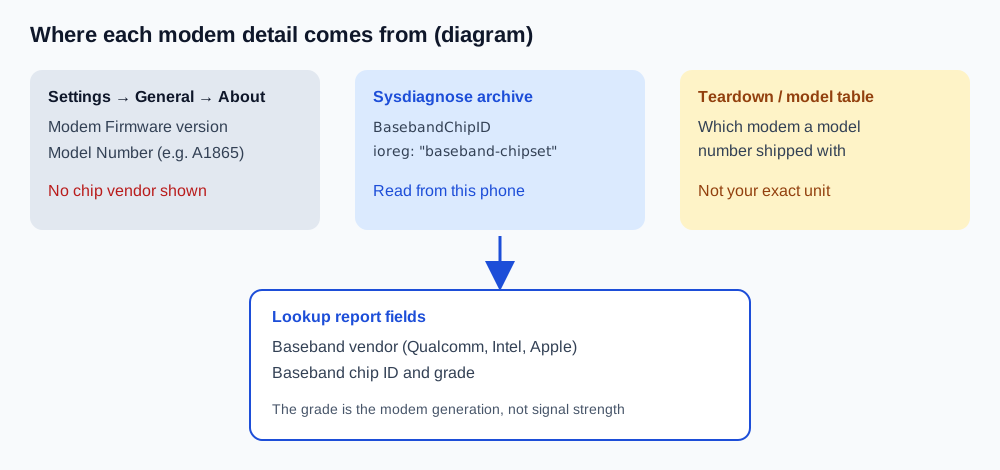
The baseband is the cellular modem: the chip that talks to the carrier network. Its software is the Modem Firmware that Apple lists under Settings → General → About (Apple Support). That version number changes with iOS updates. It doesn't name the chipmaker, so most "iPhone baseband check" searches end on a model table.
Which modem each iPhone uses
These come from teardowns and Apple's own announcements:
| iPhone | Modem | Source |
|---|---|---|
| iPhone 7 | Qualcomm MDM9645M (A1660) or Intel XMM7360 (A1778) | TechInsights |
| iPhone 8 | Qualcomm X16 / MDM9655 (A1863) or Intel XMM7480 (A1905) | Ars Technica |
| iPhone X | Qualcomm MDM9655 (A1865) or Intel XMM7480 (A1901) | Techwalls |
| iPhone XS, XS Max, XR | Intel PMB9955 (likely XMM7560) | iFixit |
| iPhone 11 series | Intel XMM7660 (likely) | TechInsights via archive |
| iPhone 12 series | Qualcomm X55 | FoneArena |
| iPhone 13 series | Qualcomm X60 | TechInsights |
| iPhone 14 Pro / Pro Max | Qualcomm X65 | MacRumors |
| iPhone 15 / 15 Plus | Qualcomm X70 | GSMArena |
| iPhone 16 | Qualcomm SDX71M | iFixit |
| iPhone 16e | Apple C1 | Apple Newsroom |
| iPhone Air | Apple C1X | Apple Newsroom |
| iPhone 17 Pro Max | Qualcomm X80 | MacRumors |
Some rows describe the units that were taken apart, and the reports themselves say "likely" for a few chips. MacRumors adds that the iPhone 17 and 17 Pro very likely use the same X80. If a model isn't listed, check the phone itself rather than guessing.
Three ways to check your iPhone's baseband
| Method | What you get | Names the vendor? |
|---|---|---|
| Settings → General → About → Modem Firmware | Firmware version | No |
| Settings → General → About → Model Number, then the table above | The modem that model shipped with | Indirectly |
| Sysdiagnose + lookup | The chip ID read from this phone | Yes |
To see the A-number, tap the part number next to Model Number in About. For an iPhone 7, 8 or X, the model number is what separates the Qualcomm and Intel versions. On later models it mostly tells you the region.
How to read the baseband from a sysdiagnose
- Capture a sysdiagnose. Press both volume buttons and the side button together briefly, then wait about 10 minutes. The full steps are in How to get a sysdiagnose file on iPhone.
- Find it under Settings → Privacy & Security → Analytics & Improvements → Analytics Data, as the newest
sysdiagnose_entry. - Import it at /lookup/ in Safari. The archive is unpacked in your browser, and only the extracted configuration fields are sent.
- Read the baseband row. The tool looks for a
BasebandChipIDvalue, orbaseband-chipsetin the I/O registry, and maps it to a vendor:
| Chip ID seen | Report shows |
|---|---|
MDM…, SDX…, X80, MAV… |
Qualcomm |
XMM…, ICE |
Intel |
C1, C1X, C2 |
Apple |
| Anything else | Unknown baseband (with the raw ID) |
What's inside an iPhone sysdiagnose log explains where the I/O registry files live if you'd rather look yourself.
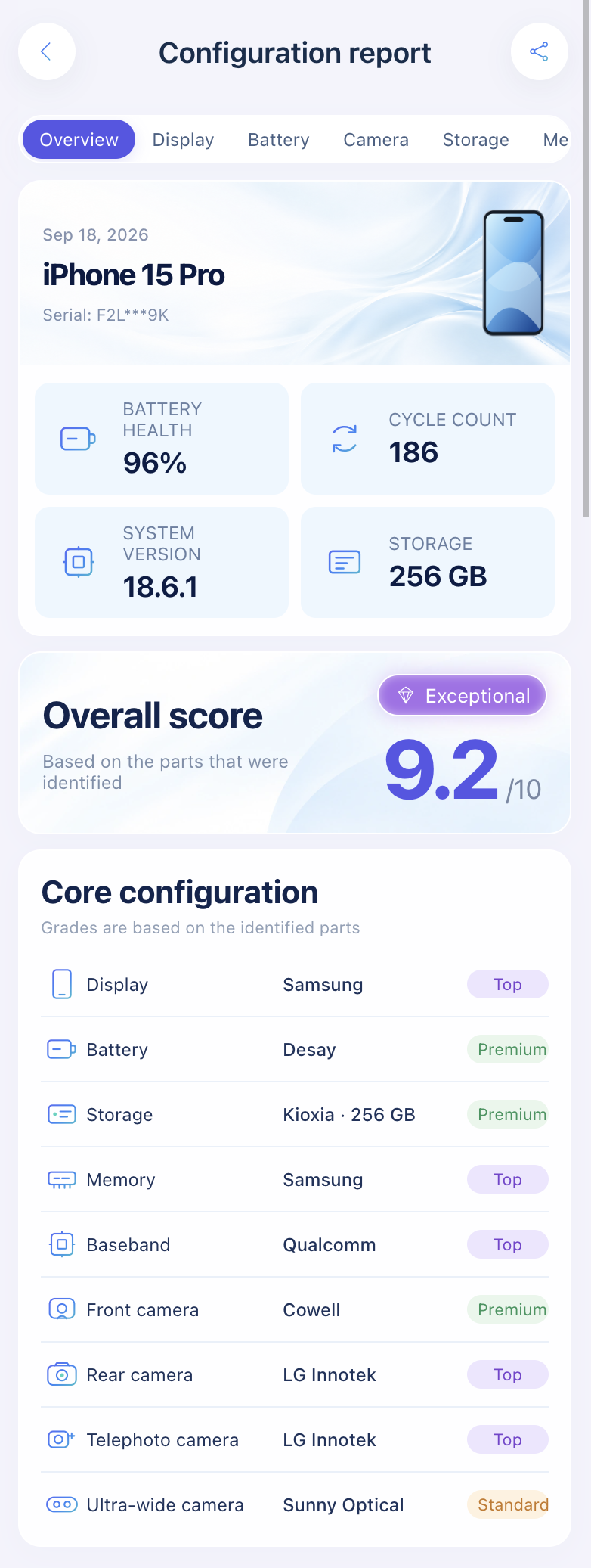
Import a sysdiagnose to see the baseband vendor and chip ID next to the display, battery, camera, storage and memory makers.
Open the lookup toolHow the report grades the baseband
The report puts a tier label on the modem: Qualcomm X55 and later as top, Apple C1, C1X and C2 as mainstream, and Intel as regular. That's this site's own rule, explained on the About page. It describes the modem generation, not your signal. The baseband grade is shown but doesn't change the overall score.
Baseband issues: what the check can and can't tell you
When an iPhone shows No Service, look at Modem Firmware first. Apple Community volunteers commonly advise that a blank field points to a modem firmware problem, often fixed by restoring with a computer and then restoring your backup. If a version is shown but the phone still has no service, hardware is more likely, so contact Apple. Apple once ran an iPhone 7 "No Service" repair program for some A1660, A1779 and A1780 units. It has now ended.
A vendor check won't fix a connection, but it helps when buying used. If a listing says iPhone 8 and the model number says A1863, you should see Qualcomm. Apple's Parts and Service History doesn't list the modem, so pair this with the full original-parts check. A serial number lookup won't show it either. Here's why.
FAQ
Can I see Qualcomm or Intel in iPhone Settings?
No. Settings shows the modem firmware version and model number, not the chip vendor.
Is Qualcomm better than Intel in iPhones?
Apple shipped both in the same iPhone 7, 8 and X models, and reports at the time said it capped the Qualcomm versions to match the Intel ones. There's no single answer for every network.
Which iPhones have Apple's own modem?
iPhone 16e (C1) and iPhone Air (C1X), according to Apple's announcements.
Can the modem be replaced?
The modem sits on the logic board, so it only changes with a board repair or swap. A modem that doesn't match the model number is worth asking about.
My report says "Unknown baseband". Is something wrong?
Not necessarily. An incomplete archive or a chip ID the tool doesn't recognize yet can both produce it. Capture a fresh sysdiagnose and compare with the table above.
Sources: Apple Support: Get information about your iPhone, Parts and Service History, iPhone 7 "No Service" program. Apple Newsroom: iPhone 16e, iPhone Air. Teardowns and reports linked in the model table.
Import a sysdiagnose file to see the display, battery, camera, storage, memory and baseband makers in one report. Lookups use a paid quota.
Open the lookup tool