How to Check If iPhone Parts Are Original (Free and Paid Methods Compared)
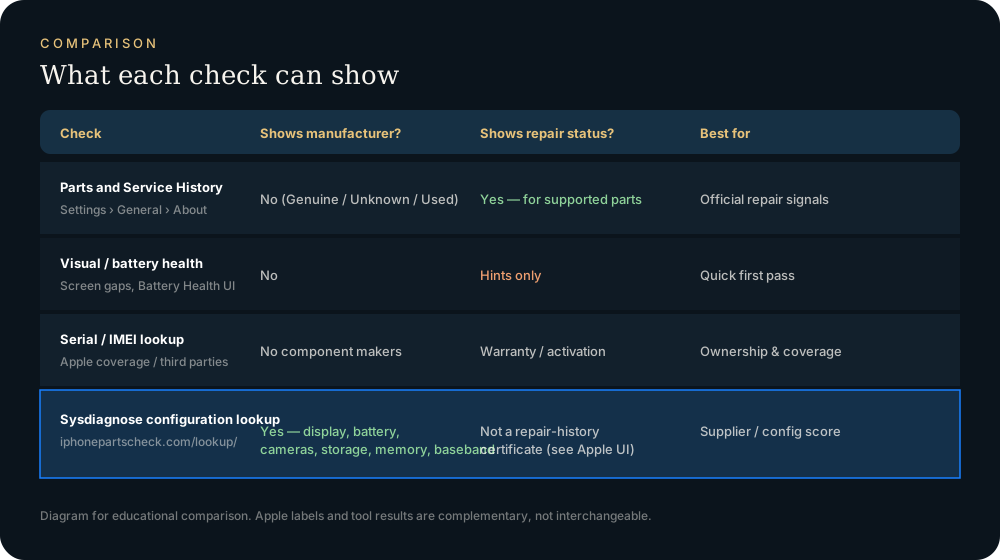
Short answer: the free, official check is Settings → General → About → Parts and Service History (iOS 15.2 or later). It tells you whether the battery, display, cameras or logic board were replaced, and whether the replacement is genuine. It doesn't name the companies that made the parts, and serial or IMEI checkers can't either. To get the maker of each part (Samsung vs BOE screen, Desay vs Sunwoda battery, and so on), you need a tool that reads the phone's diagnostic data.
What each method can tell you
| Method | Cost | Was a part replaced? | Is the replacement genuine? | Who made the part? |
|---|---|---|---|---|
| Parts and Service History (Settings) | Free | Yes, most recent repair | Yes | No |
| Battery Health (Settings → Battery) | Free | Indirectly ("Unable to verify") | Partly | No |
| Serial / IMEI checkers (e.g. Apple Check Coverage) | Free | No | No | No |
| Reading the sysdiagnose yourself | Free, about 20 min | No | No | Yes, if you know the fields |
| Desktop tools (3uTools, iMazing) | Free / paid | Partly | No | Partly |
| This site's lookup | Paid quota | No | No | Yes: display, battery, cameras, storage, memory, baseband |
The most reliable answer comes from combining Settings (is it genuine?) with a part-maker lookup (who made it?).
Parts and Service History: which parts on which iPhone
Per Apple's Parts and Service History page:
| Model | Battery | Display | Front camera | Rear cameras | Logic board |
|---|---|---|---|---|---|
| iPhone 12 and later | ✓ | ✓ | ✓ | ✓ | ✓ |
| iPhone 11 / 11 Pro / 11 Pro Max | ✓ | ✓ | – | – | – |
| iPhone XR, XS, XS Max, SE (2nd/3rd gen) | ✓ | – | – | – | – |
If the section doesn't appear at all, Apple has no record of a repair. The labels:
- Genuine: repaired with genuine Apple parts and processes.
- Used (iPhone 15 and later, iOS 18+): a genuine part that was previously installed in another iPhone.
- Finish Repair: a new genuine part is installed, but Repair Assistant hasn't been run. Face ID and Touch ID stay disabled until it is.
- Unknown: nongenuine, malfunctioning, not linked after repair, or modified.
- Unverified (logic board only): the board came from another iPhone. Apple Pay may stop working.
What the labels mean for each part, and what to do about an Unknown label: The "Unknown Part" message explained.
What serial and IMEI checkers can't see
The serial number and IMEI identify the phone, not its parts. They can confirm the model, warranty status, activation lock and carrier lock. They contain nothing about the panel, battery cell or camera module inside. Any website that claims to show the "screen manufacturer" from an IMEI is guessing from the model. At best that gives the list of possible suppliers in our by-model table, not the part in your phone.
Finding the part makers: the sysdiagnose method
Every iPhone can write a sysdiagnose archive, a snapshot of system logs and hardware registry data. Inside it are fields such as:
| Part | Field in the archive | What it shows |
|---|---|---|
| Display | raw-panel-serial-number |
Panel serial; the first 3 characters identify Samsung / LG / BOE |
| Battery | BatteryInstalled, NominalChargeCapacityPercent, CycleCount |
Battery serial, health %, cycles |
| Rear camera | BackCameraModuleSerialNumString |
Module serial; prefix indicates LG Innotek, Cowell, etc. |
| Front camera | FrontCameraModuleSerialNumString |
Module serial; prefix indicates LG Innotek, Foxconn, etc. |
| Memory | dram-vendor-id |
DRAM maker ID (Samsung, SK hynix, Micron) |
You can dig these out by hand from the files in the archive, or import the archive at /lookup/ and get one report: vendor, serial and grade for each part, plus an overall score. How to capture the file: How to get a sysdiagnose on iPhone.
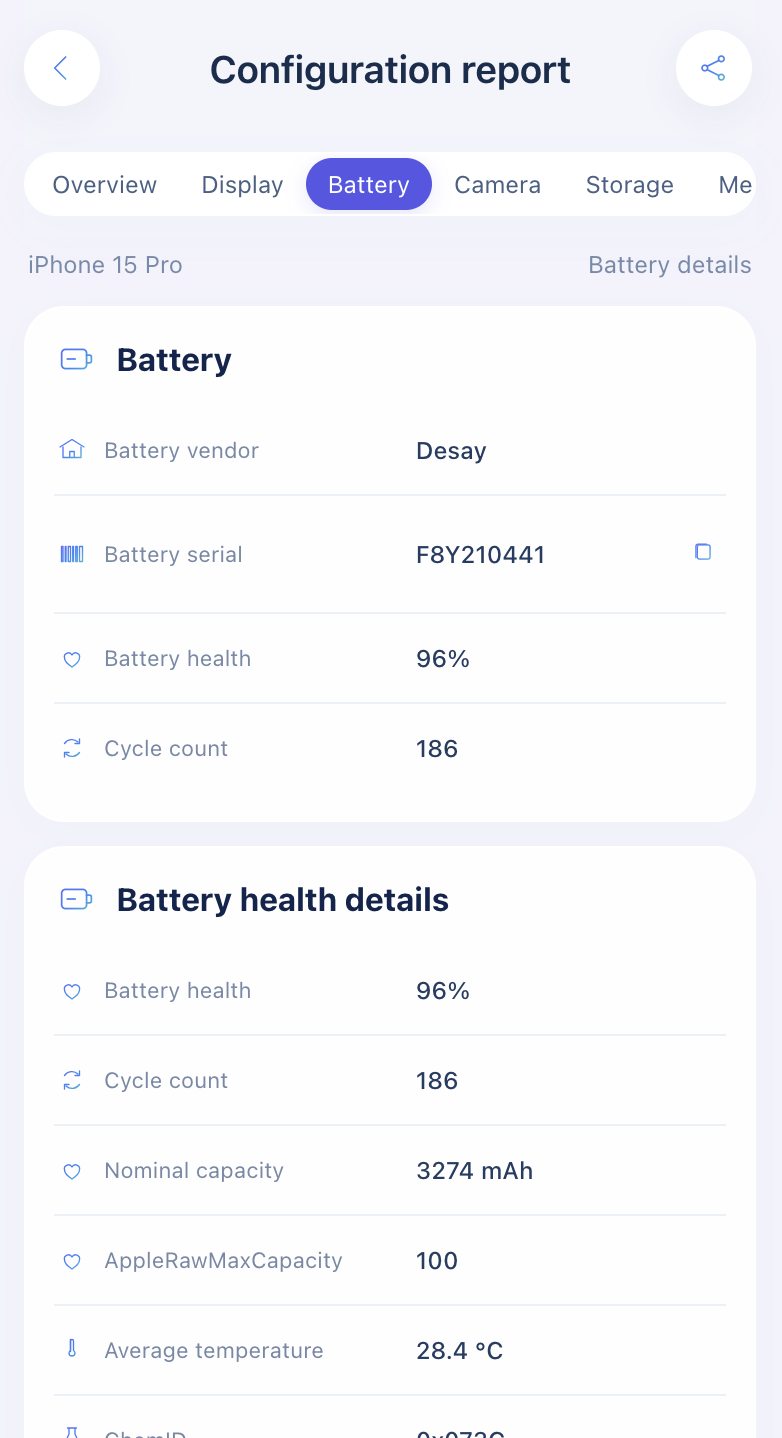
Privacy: the archive is unpacked in your browser. Only the extracted configuration fields are sent to build the report, not the archive itself.
A 10-minute check before you buy a used iPhone
- Settings → General → About: any Parts and Service History entries? Note each label.
- Settings → Battery → Battery Health: maximum capacity and cycle count. Watch for "Unable to verify this iPhone has a genuine Apple battery".
- True Tone and touch: see Is my iPhone screen original?
- Optional: ask the seller for a sysdiagnose and run a lookup to see the screen, battery and camera makers.
- Check Coverage on apple.com with the serial: confirms the model, valid purchase date and warranty status.
FAQ
Is there a free iPhone parts checker?
Yes. Parts and Service History in Settings is free and authoritative for "was it replaced, and is it genuine". Reading part makers out of a sysdiagnose by hand is also free. Our lookup charges per report because it decodes and grades every part at once.
Does "Genuine" mean the part was never replaced?
No. Genuine only appears after a repair. A part that was never replaced has no entry.
Will Parts and Service History show every old repair?
No. Only the most recent service for each part is shown.
Import a sysdiagnose file to see the display, battery, camera, storage, memory and baseband makers in one report. Lookups use a paid quota.
Open the lookup tool