"Unknown Part" or "Genuine Apple Part" on iPhone: What the Message Means
Short answer: the word next to a part under Settings → General → About → Parts and Service History is Apple's verdict on the most recent repair of that part. Genuine means a new Apple part installed with Apple's process. Used means a genuine part from another iPhone. Finish Repair means calibration is still pending. Unknown means Apple couldn't verify the part (nongenuine, faulty, not linked, or modified). Unverified applies only to a logic board taken from another iPhone. If the section isn't there at all, no repair has been recorded.
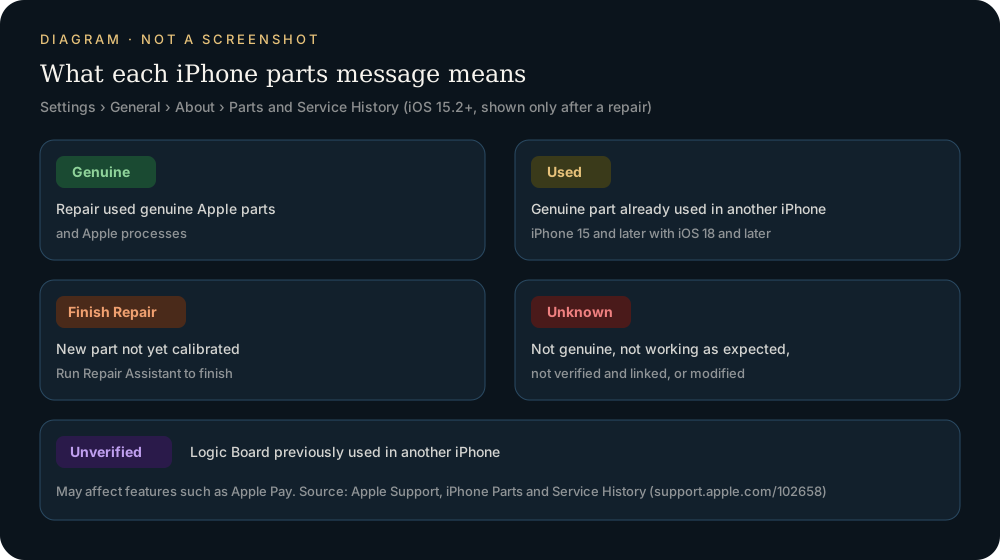
Where the iPhone genuine parts settings live
There is no switch to turn on. Parts and Service History is a read-only section that iOS adds by itself once a repair is recorded. Apple documents it on iPhone Parts and Service History:
- Make sure the iPhone runs iOS 15.2 or later.
- Open Settings, tap General, then tap About.
- Scroll down. If the iPhone has been repaired, you will see Parts and Service History.
If the section is missing, Apple's wording implies the simple reading: no repair of a covered part has been recorded for that device. It does not mean information is being hidden from you.
After a service is completed and the iPhone connects to the internet, Apple says you can tap a part to see more information, including the date of the service. One limit worth remembering: if a part has been serviced more than once, only the most recent service appears.
On iOS versions earlier than 15.2, Apple says you can only see whether a replacement part is identified as Unknown. On iOS 15.1 and earlier, the part pages describe an "Important Display Message", "Important Battery Message" or "Important Camera Message" shown instead of today's Unknown label.
What each message means
Apple lists these labels on its Parts and Service History page. In Apple's words:
| Label | What Apple says it means | Affects use? |
|---|---|---|
| Genuine | The repair was done using genuine Apple parts and processes. | No |
| Used | The part was already used or installed in another iPhone. | No, but Apple notes performance and quality might be inconsistent |
| Finish Repair | A new part is installed, but calibration with Repair Assistant is not done yet. | Partly—Face ID or Touch ID won't work until those parts are calibrated |
| Unknown | Shown in some situations, such as a non-genuine replacement or a part not working as expected. | Usually no, but it might affect trade-in value |
| Unverified | The Logic Board was previously used in another iPhone. | Might affect features such as Apple Pay |
A few points that people often get wrong:
- "Genuine Apple Part" is not the exact wording in Settings. The label next to the part simply reads Genuine. Searches for "genuine Apple part" usually mean this label.
- Genuine does not mean "never replaced." It appears because a part was replaced—correctly, with a genuine Apple part and Apple's calibration process.
- Used is still a genuine Apple part. Apple's Parts Support for iPhone page defines used Apple parts as genuine parts taken from an existing device of the same model. Apple also notes that used parts and repairs with them are not covered by its product warranty or an AppleCare plan.
- Finish Repair is a to-do, not a verdict. Apple explains that genuine parts are calibrated with data stored at the time of manufacture, and that data is retrieved to finish the repair.
Why a part shows Unknown
The Unknown label is the one that worries people most. Apple's part pages for displays, batteries and cameras all list the same four reasons. You'll see Unknown if the part:
- Isn't a genuine Apple part
- Isn't functioning as expected
- Hasn't been verified and linked to your iPhone after the repair was completed
- Has been modified or is otherwise unable to be verified
So Unknown is not automatic proof of a fake part. A genuine part that was never verified and linked, or one that is faulty, can show it too. What Unknown does tell you is that Apple could not confirm the part through its normal process—and Apple warns that an Unknown part might affect the trade-in value.
Apple also documents symptoms that can come with non-genuine parts. For displays these include Multi-Touch problems, True Tone not working correctly, incorrect color calibration, and lower maximum brightness. For batteries, if a battery is unverified, battery health information might not be accurate, and you may see "Unable to verify this iPhone has a genuine Apple battery" under Settings → Battery → Battery Health. If the battery is your main worry, see Original vs Aftermarket iPhone Battery. For screens, see Is My iPhone Screen Original?.
Which iPhones and parts are covered
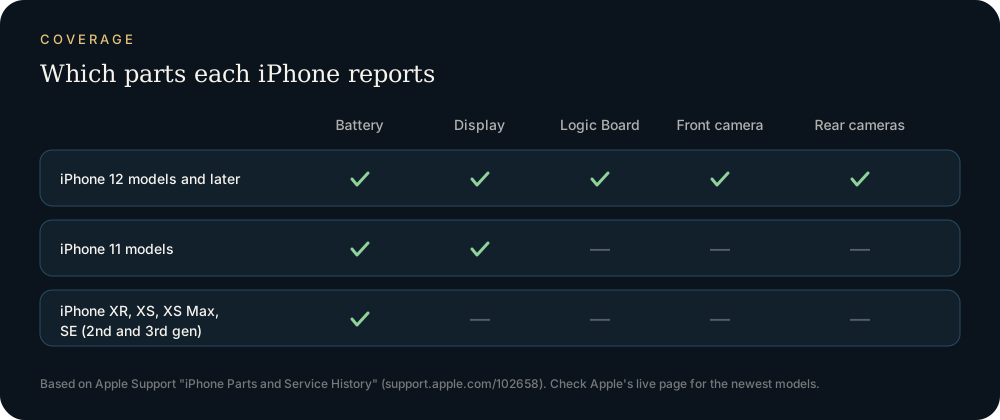
Coverage depends on the model. This table follows the one on Apple's Parts and Service History page at the time of writing:
| iPhone model | Battery | Display | Logic Board | Front camera | Rear cameras |
|---|---|---|---|---|---|
| iPhone 12 models and later | ✓ | ✓ | ✓ | ✓ | ✓ |
| iPhone 11 models | ✓ | ✓ | — | — | — |
| iPhone XR, XS, XS Max, SE (2nd and 3rd generation) | ✓ | — | — | — | — |
The Used label is newer. Apple's part pages say it appears on iPhone 15 and later with iOS 18 and later for batteries, displays and cameras. Apple's Parts Support page lists more parts that support used Apple parts on those models, such as back glass, speakers, the Taptic Engine and the USB-C connector.
Apple updates these tables as new models ship, so check the live support pages if your model is very new.
Notifications you might see after a repair
Besides the labels, iOS can show notifications. According to Apple:
- Unknown part detected: iPhone shows a notification the first time you unlock it after a repair, and another one five days later.
- "Apple has updated the device information for this iPhone": for displays and batteries, this means Apple has updated the device information it keeps for that iPhone for service needs, safety analysis and to improve future products. Apple says these messages don't affect your ability to use your iPhone.
- Serious component issue: if a problem significantly affects how the device works and needs attention, iPhone shows a one-time notification the first time you unlock it after the issue is detected. It stays in Parts and Service History until you dismiss it.
- Unverified Logic Board: a notification appears in Settings until you dismiss it. To find it, go to Settings → General → About.
What to do if you see Unknown or Finish Repair
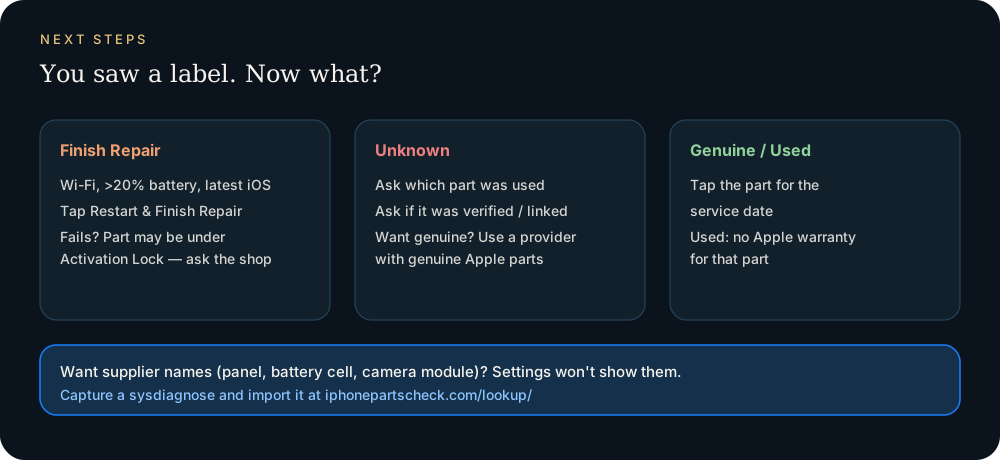
If you see Finish Repair, run Repair Assistant. Apple's Repair Assistant guide says you need Wi-Fi, more than 20 percent battery and the latest iOS. Then go to Settings → General → About → Parts & Service History and tap Restart & Finish Repair. Apple lists Repair Assistant support for battery, display, front and rear cameras on iPhone 12 and later, plus more parts on newer models. If it fails and someone else installed the part, Apple says the part might be protected by Activation Lock. Ask the repair shop to finish the repair. A used part linked to another person's Apple Account has to be unlocked with that account. Apple can't remove that lock for you (If a part is locked to someone else's Apple Account).
If you see Unknown, first ask whoever did the repair which part they used and whether they finished calibration. If the phone is still with the shop, ask them to check the installation. If you want a genuine part, Apple, Apple Authorized Service Providers and Independent Repair Providers have access to genuine Apple parts. Apple's Parts Support page also says Apple won't actively disable a third-party part unless it affects security and privacy, for example parts used for Face ID and Touch ID.
If you're buying a used iPhone, ask the seller for a screenshot of every Parts and Service History row and the Battery Health screen. Then compare the price with what the labels say. Unknown on the display of a "like new" phone is worth a discount or a question, even if it isn't proof of fraud. A seller who won't show this free, official screen is a bigger warning sign than any single label.
What the message does not tell you
Parts and Service History answers one question: was this part replaced, and did Apple's process recognize it? It does not name who manufactured the part. You won't see Samsung Display, BOE, Desay, Sunwoda or LG Innotek in Settings. It also won't show a repair on a part your model isn't covered for. And when a part has been serviced more than once, it shows only the latest service.
For supplier names, use the panel, battery and camera-module serials in a sysdiagnose: see who made my screen, battery makers and camera makers.
FAQ
What does "Genuine" mean in iPhone Parts and Service History?
It means the repair was done using genuine Apple parts and processes. It appears only after a part has been replaced, so it isn't the same as "original factory part."
Does an Unknown part mean my screen or battery is fake?
Not necessarily. Apple lists four possible reasons: the part isn't genuine, it isn't working as expected, it hasn't been verified and linked after the repair, or it was modified or can't be verified. Ask the repairer which part was used and whether calibration was finished.
Will an Unknown part stop my iPhone from working?
Apple says these messages don't affect your ability to use your iPhone, unless the description says otherwise. Apple does note possible quality issues with non-genuine parts. It also says Face ID and Touch ID parts won't work until they are calibrated.
Why don't I see Parts and Service History at all?
The section only appears when a repair has been recorded, and it needs iOS 15.2 or later. Coverage also depends on the model. For example, Apple's table lists only the battery for iPhone XR, XS and SE (2nd and 3rd generation).
Can I remove the Unknown message?
Apple doesn't describe a way to hide it. Apple's own pages describe two paths: finish a pending repair with Repair Assistant, or have the part replaced with a genuine Apple part by a provider that has access to them.
Does Parts and Service History show every past repair?
No. Apple states that if a part has been serviced more than once, only the most recent service appears.
Does the message show who made the part?
No. To see supplier names, such as which company made the display panel or battery cell, use a sysdiagnose with the lookup tool. See every parts-check method compared.
Sources: Apple Support — Parts and Service History, genuine displays, genuine batteries, genuine cameras, Parts Support, Repair Assistant, locked parts.
Import a sysdiagnose file to see the display, battery, camera, storage, memory and baseband makers in one report. Lookups use a paid quota.
Open the lookup tool