Original vs Aftermarket iPhone Battery: 4 Checks That Actually Work
Short answer: on iPhone XR, XS and later, open Settings → General → About. No Battery entry under Parts and Service History means no recorded battery replacement. Genuine or Used means an Apple part. Unknown means aftermarket, or a genuine battery that was never linked. Then open Settings → Battery → Battery Health: the message "Unable to verify this iPhone has a genuine Apple battery" means the health figures can't be trusted.
Check 1: Parts and Service History
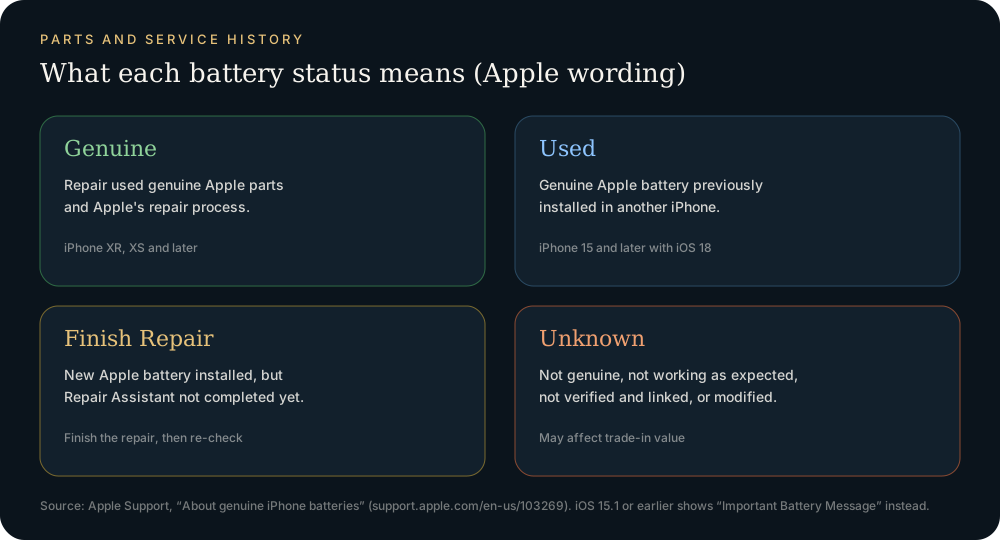
| Battery label | Meaning |
|---|---|
| (no entry) | No recorded replacement |
| Genuine | New Apple battery, repair completed with Apple's process |
| Used (iPhone 15+, iOS 18+) | Genuine Apple battery reused from another iPhone of the same model |
| Finish Repair | New Apple battery installed; Repair Assistant still needs to run |
| Unknown | Nongenuine, not working as expected, not linked, or modified |
Source: Apple – About genuine iPhone batteries. On iOS 15.1 or earlier, you'll see an "Important Battery Message" under Battery Health instead of Unknown.
Check 2: Battery Health screen
Open Settings → Battery → Battery Health.
- "Unable to verify this iPhone has a genuine Apple battery": Apple says the health information "might not be accurate". An aftermarket battery reporting 100% here is no proof of anything.
- Maximum Capacity: a genuine battery that's a few months old and reads exactly 100% with a high cycle count is inconsistent. Ask when it was replaced.
- Cycle count and first-use date (iPhone 15 and later): a first-use date much later than the phone's purchase date means the battery was swapped.
Check 3: Behavior after an iOS update
Apple warns that nongenuine batteries can behave unexpectedly after installation, after software updates, or while charging. Typical signs: the percentage jumps (for example 30% to 5%), the phone shuts down early in the cold, or it charges slowly. None of these proves a battery is aftermarket, but combined with an Unknown label they confirm it.
Check 4: Battery serial and maker in diagnostic data
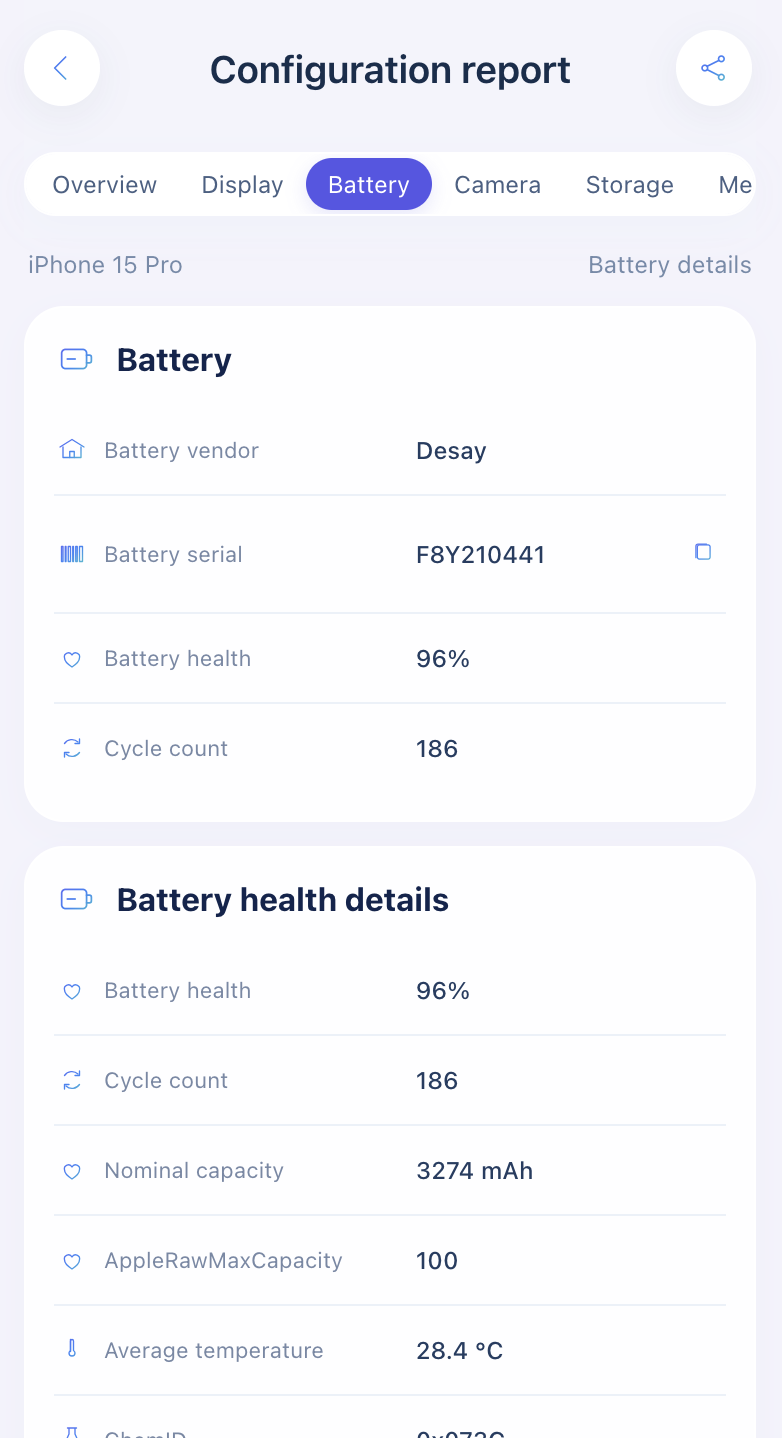
A sysdiagnose archive contains the battery's own serial (BatteryInstalled), health (NominalChargeCapacityPercent) and cycle count (CycleCount). Our lookup decodes these into the battery vendor (Desay, Sunwoda, Simplo…), serial, health and cycles. Two things are useful here:
- Compare health with Settings. A big gap between the logged capacity and the Settings figure on an "Unable to verify" phone tells you which number to trust.
- Empty vendor field. If the report shows "--" for the battery vendor, the archive had no battery identity data it could decode. That is a reason to look harder at Settings, not proof of a fake: the field can also be missing because of the iOS build or a partial capture.
Capturing the archive: How to get a sysdiagnose. Supplier background: Who makes iPhone batteries?
Original, OEM, genuine, aftermarket: the words sellers use
| Seller's word | What it usually means | What to verify |
|---|---|---|
| Original | Factory battery, never replaced | No Battery entry in Parts and Service History |
| Genuine / Apple part | Apple replacement battery | Genuine label |
| OEM | A marketing term with no fixed meaning; cannot be verified | Expect Unknown unless Apple-linked |
| High-capacity / aftermarket | Third-party cell and pack | Unknown + "Unable to verify" |
FAQ
Is Unknown the same as fake?
Not always. A genuine Apple battery installed without Apple's linking process also shows Unknown. Apple's Repair Assistant can finish the repair for genuine parts.
Will an aftermarket battery stop my iPhone working?
No. Apple says the messages don't affect use. The risks are inaccurate health readings, fit and, for poor-quality cells, safety.
Does the lookup prove a battery is genuine?
No. Only Apple's Parts and Service History does that. The lookup tells you the maker, the serial and the logged health.
Import a sysdiagnose file to see the display, battery, camera, storage, memory and baseband makers in one report. Lookups use a paid quota.
Open the lookup tool