Free iPhone IMEI Check: What It Can and Can't Tell You
Short answer: A free IMEI check can reliably tell you two things: whether the iPhone is on the GSMA Block List as lost or stolen, and which model family the number belongs to. Use Swappa's IMEI check or CTIA's Stolen Phone Checker (US) for the blocklist, and Apple's Check Coverage with the serial number for model and warranty. The "iCloud status", "Find My" and "SIM lock" fields many free checkers show don't come from any public Apple lookup, so confirm those on the phone itself. And no IMEI check, free or paid, can tell you whether the screen, battery or cameras were replaced.
What a free IMEI check actually looks up
Most free IMEI checker sites look alike: a box for 15 digits and a report with a dozen green or red rows. What matters is where each row comes from, because the sources aren't equally trustworthy.
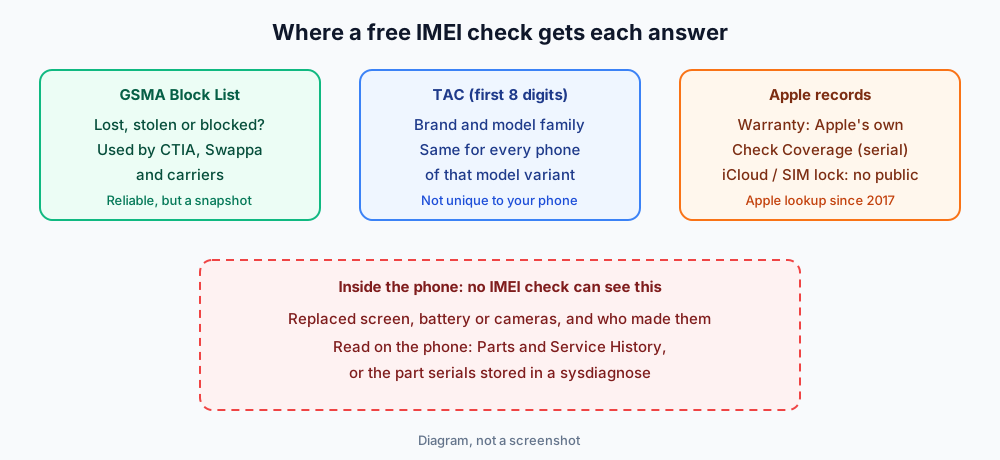
| Report field | Where it comes from | How far to trust it |
|---|---|---|
| Blocklist / blacklist (clean, blocked) | The GSMA Device Registry, which carriers report lost and stolen phones to | Good, but only as of today; CTIA says a new report can take 24 hours or more to appear |
| Brand and model | The TAC, the first 8 digits of the IMEI, which GSMA assigns per device model | Good for the model family; every phone of that variant shares it |
| Valid or invalid IMEI | The 15th digit is a Luhn check digit calculated from the first 14 | Catches typos and made-up numbers only |
| Warranty, AppleCare, model, color | Apple's Check Coverage, which uses the serial number | Good when you run it yourself on Apple's site |
| iCloud status / Find My on or off | Not a public Apple service | Treat as a hint, then verify on the device |
| SIM lock / original carrier | Not a public Apple service; some carriers check their own devices | Treat as a hint, then check Settings |
| Repairs, replaced parts, part makers | Not in any IMEI database | Not available from an IMEI check |
The two answers you can rely on
Blocklist status
This is the main reason to run an IMEI check. Swappa's checker reports whether the IMEI is allowed ("clean and ready for activation according to the GSMA global registry") or blocked (reported lost or stolen), and its blog says private users get 10 free checks every 24 hours. CTIA's Stolen Phone Checker uses GSMA Device Check too and is aimed at US buyers.
Swappa's own results guide adds two outcomes people often misread. Unknown can mean there isn't enough data yet, for example on a very new device. TAC only means the site could identify the model but had no IMEI-level status, so check with the carrier before you buy.
A blocklist entry can also come from an unpaid carrier balance, not just theft. Either way, a blocked phone may not activate on networks that honor the list, so walk away.
The model
The TAC tells you the brand and model family. It's the fastest way to catch a seller who sends an IMEI that belongs to a different phone. If the checker says iPhone 12 and the listing says iPhone 15 Pro, the number isn't from that phone.
The TAC can't confirm storage size or color on its own, since every phone of that variant shares it. For those, Apple's Check Coverage with the serial number, or Settings → General → About on the phone, is the better source.
Why "iCloud status" from a free checker isn't proof
Apple used to have a public Activation Lock status page at iCloud.com/activationlock where anyone could enter an IMEI or serial. Apple removed it in January 2017, as 9to5Mac and AppleInsider reported at the time, and it hasn't come back.
Some checker sites say their reports come from Apple's GSX database. GSX (Global Service Exchange) is Apple's service system, and Apple says GSX accounts are limited to technicians working at Apple-authorized service facilities. A public website reselling that data isn't an Apple service, so you can't tell how current or accurate its answer is.
That doesn't mean the field is always wrong, only that it's not the final word. Apple's own advice in If you want to buy a preowned iPhone is to check on the device: if you see iPhone Locked to Owner, or setup asks for the previous owner's Apple Account, don't buy it. For carrier lock, Settings → General → About → Carrier Lock reads No SIM restrictions on an unlocked iPhone.
What no IMEI check can tell you
The IMEI is a network identifier. It's assigned at the factory and stays the same after a screen, battery or camera repair, so no IMEI database records what's inside the phone now. A "full report" that costs a few dollars draws on the same kinds of sources as the free one, and it can't see inside the phone either.
To check parts, use the phone itself:
- Parts and Service History in Settings → General → About (iOS 15.2 or later on supported models) labels replaced parts as Genuine, Used, Unknown or Unverified, per Apple Support. Our guide to what the Genuine and Unknown Part messages mean explains each label.
- The part serials in a sysdiagnose. The phone records the display panel serial (
raw-panel-serial-numberinioreg/IODeviceTree.txt) and the battery and camera module serials (such asBackCameraModuleSerialNumStringinioreg/IOService.txt). Our lookup reads those fields and names the maker of each part, and you can compare the screen against the suppliers Apple used for that model. If you've never made one, here's how to get a sysdiagnose file.
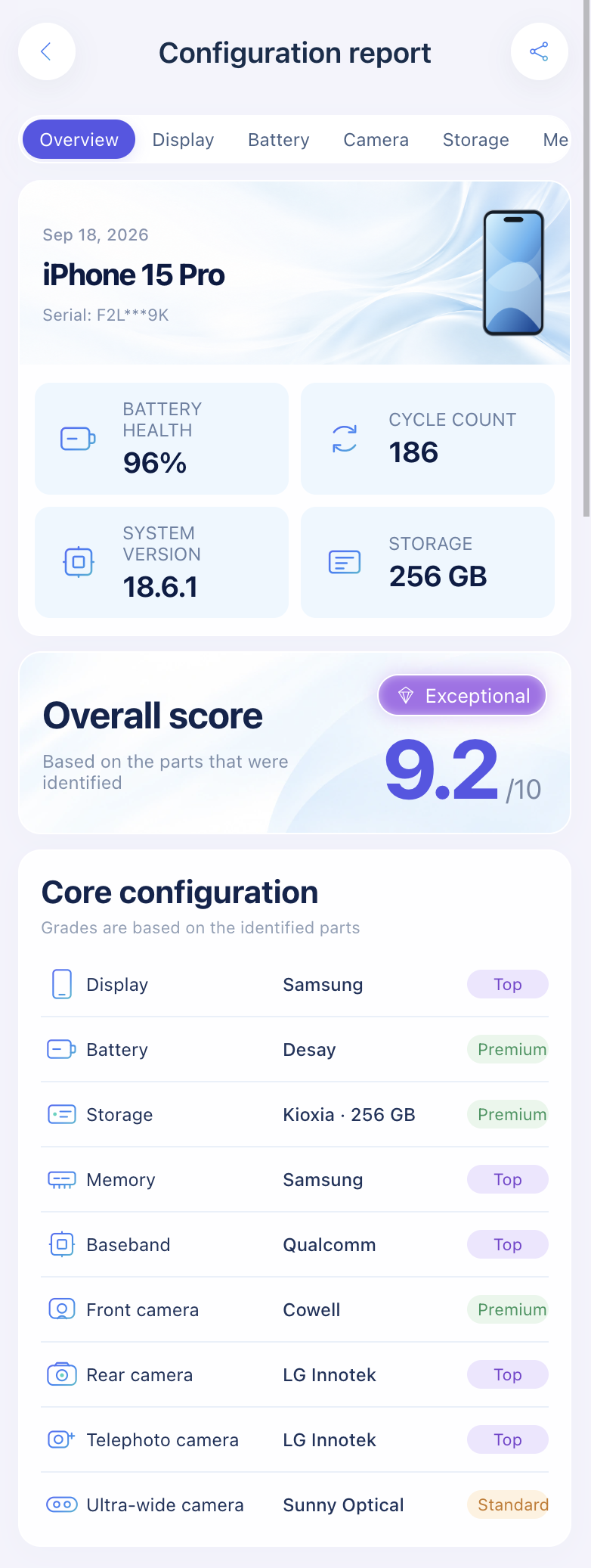
Import a sysdiagnose to see who made the display, battery, cameras, storage, memory and modem.
Open the lookup toolHow to run a free IMEI check properly
- Get the IMEI from the phone. Dial
*#06#and compare it with Settings → General → About. A number from a listing or a box label only proves something about that listing or box. If you don't have the phone yet, see how to find an iPhone IMEI. - Use the primary IMEI. Dual-SIM iPhones show two. Swappa asks for the one for the primary SIM.
- Run a blocklist check on Swappa or, in the US, the Stolen Phone Checker. Run it again on the day you pay, since reports can lag.
- Run the serial through Apple's Check Coverage to confirm the model and warranty from Apple directly.
- Verify locks on the device: Activation Lock during setup, Carrier Lock in Settings.
- Check the parts with Parts and Service History and a sysdiagnose.
For the full in-person routine, use our 15-point used iPhone checklist. If you're comparing desktop tools as well, see used iPhone checker tools compared.
FAQ
Is a free IMEI check as good as a paid one?
For blocklist status, yes. Free checkers like Swappa query the same GSMA registry. Paid reports add fields like original carrier or purchase date, but none of them can show repairs or replaced parts.
Can I check iCloud lock by IMEI for free?
Not through Apple. Apple has had no public Activation Lock lookup since 2017. Third-party results are a hint, so confirm on the phone during setup.
Does Apple have an official IMEI checker?
Apple's Check Coverage page confirms the model and warranty from the serial number. It doesn't report blocklist, iCloud or SIM-lock status.
Is it safe to share an IMEI with a checker site?
An IMEI on its own doesn't give anyone access to your phone or account, and buyers ask for it routinely. Stick to well-known checkers and skip any site that asks for your Apple Account password or a payment to "unlock" the result.
Sources: Swappa IMEI check and FAQ; Swappa: How to check if a phone is stolen; CTIA Stolen Phone Checker; Apple Support: If you want to buy a preowned iPhone, iPhone Parts and Service History, How to access ATLAS (GSX access); 9to5Mac on the Activation Lock page removal.
Import a sysdiagnose file to see the display, battery, camera, storage, memory and baseband makers in one report. Lookups use a paid quota.
Open the lookup tool