The Best Used iPhone Checker Tools and Apps Compared
Short answer: No single used iPhone checker covers everything. Use the phone's own Settings for Activation Lock, Battery Health and Parts and Service History; a stolen-phone IMEI lookup for blocklist status; a desktop tool such as 3uTools or coconutBattery for cycle counts and a second opinion on replaced parts; and a sysdiagnose lookup like ours if you want to know which companies made the screen, battery and cameras.
The trick is knowing which question each tool can actually answer, so you don't pay for one that only repeats what Settings already shows.
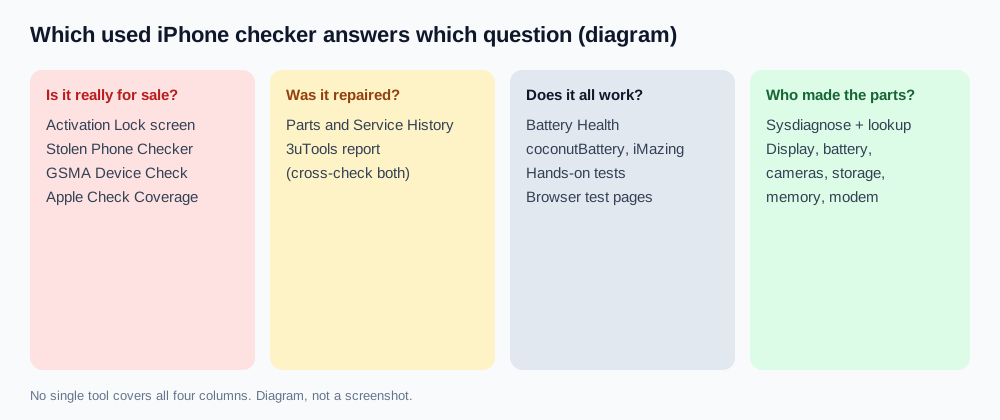
Used iPhone checkers compared
| Tool | Where it runs | Cost | What it checks | What it can't tell you |
|---|---|---|---|---|
| iPhone Settings | On the phone | Free | Activation Lock, Carrier Lock, Battery Health, Parts and Service History | Who made each part; models before iPhone XR show no parts history |
| Apple Check Coverage | Website, serial number | Free | Model, warranty and AppleCare status | Repairs, parts, blocklist status |
| CTIA Stolen Phone Checker | Website, IMEI | Free, 5 checks a day (US only) | Whether the IMEI is on the GSMA Block List | Activation Lock, repairs, parts |
| 3uTools | Windows and Mac, USB | Free | Device info, battery cycles, a verification report that flags parts not matching factory records | Whether the screen, speakers or mic actually work; it can't name the part makers |
| coconutBattery | Mac, USB or Wi-Fi | Free, paid Plus | Design vs full charge capacity, cycle count | Anything beyond the battery |
| iMazing | Windows and Mac, USB | Free features, paid licence | Battery details, device info, backups | Part makers, blocklist status |
| Browser test pages | Safari on the phone | Usually free | Dead pixels, touch, speakers, mic, cameras | Anything inside the phone |
| Our lookup | Safari, sysdiagnose file | Paid quota | Makers of display, battery, cameras, storage, memory and modem | Ownership, blocklist status, whether parts work |
Apple's built-in checks: start here
Everything that decides whether you should buy at all is free and already on the phone. Apple's guide to buying a preowned iPhone covers the order:
- Activation Lock. If the phone shows iPhone Locked to Owner or setup asks for the seller's Apple Account, stop. No app can fix that for a buyer.
- Carrier Lock. Settings → General → About → Carrier Lock reads No SIM restrictions on an unlocked phone.
- Battery Health. Settings → Battery → Battery Health (iPhone 15 and later) shows maximum capacity and, on iOS 17.4 or later, cycle count (Apple Support). Earlier models use Battery Health & Charging.
- Parts and Service History. In Settings → General → About on iOS 15.2 or later, each replaced part is labeled Genuine, Used, Unknown or Unverified (Apple Support). We explain each label in what the Genuine and Unknown messages mean.
Our 15-point used iPhone checklist walks through these on the spot.
Second hand iPhone check online: IMEI and serial websites
Online checkers only see the numbers you type in, never the hardware. They're still worth a minute:
- Blocklist. In the US, CTIA's Stolen Phone Checker uses GSMA Device Check. A green result means the IMEI isn't flagged on the GSMA Block List; red means it was reported lost or stolen or is otherwise unsuitable for networks. CTIA notes a report can take 24 hours or more to show up, so a clean result is a snapshot, not a guarantee.
- Warranty. Apple's Check Coverage confirms the model and any remaining warranty or AppleCare from the serial number.
Get the IMEI by dialing *#06# and make sure it matches Settings → General → About before you trust any lookup. Paid "full IMEI reports" can't see inside the phone either; our serial number guide explains why.
Desktop used iPhone checking apps
3uTools is the one repair shops reach for. Over USB it reads the model, IMEI, Apple ID lock status and charge cycles, and its verification report compares part serials it can read with factory records. Treat a mismatch as a reason to ask questions, not proof: on newer models some lines can show as unknown on an untouched phone, so cross-check with Parts and Service History.
coconutBattery (Mac) shows an iPhone's design capacity, full charge capacity and cycle count over USB, or over Wi-Fi in the Plus version (coconut-flavour.com). iMazing (Windows and Mac) shows similar battery details alongside backups and device info. Both are good for spotting a battery whose numbers don't match Settings.
None of these can hear a crackling speaker or see a dead touch zone. For that, test by hand or open a screen and touch test page in Safari on the phone itself.
The gap: who made the parts?
Settings and 3uTools can tell you a part was swapped. Neither names the company behind the panel or cell inside the phone now, which matters when the display is a cheaper replacement or the battery was never the original maker's. That information sits in the phone's sysdiagnose, which holds the display, battery and camera module serials plus storage, memory and modem IDs.
- Briefly press both volume buttons and the side button together, then wait about 10 minutes. Full steps: how to get a sysdiagnose file.
- Find the newest
sysdiagnose_file in Settings → Privacy & Security → Analytics & Improvements → Analytics Data. - Import it at /lookup/ in Safari. The archive is unpacked in your browser, and only the configuration fields are sent.
The report names each maker, so you can compare the screen with the suppliers Apple used for that model and see the storage chip maker.
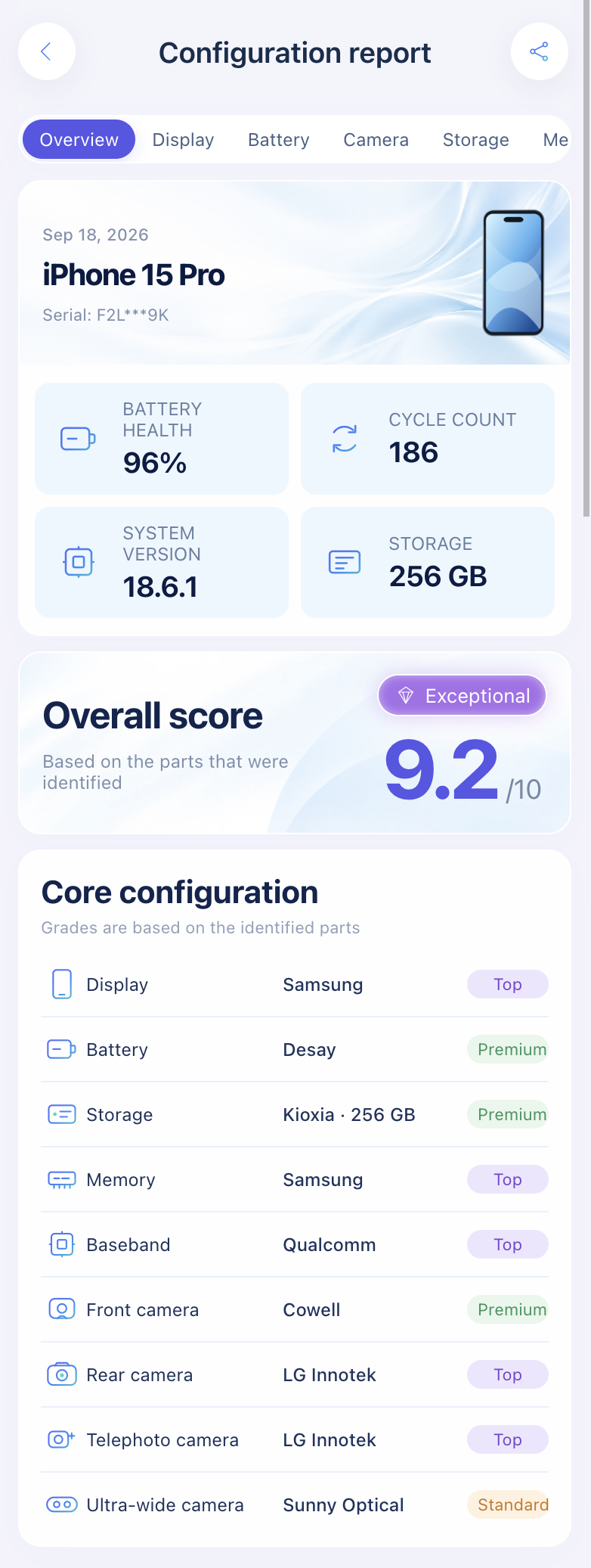
Import a sysdiagnose to see who made the display, battery, cameras, storage, memory and modem before you pay.
Open the lookup toolWhich used iPhone checker should you use?
| Situation | Use |
|---|---|
| Meeting a seller in person, no computer | Settings checks, Stolen Phone Checker, hands-on tests, sysdiagnose lookup |
| Buying from a shop with a laptop on the counter | All of the above plus 3uTools |
| You only care about the battery | Battery Health, then coconutBattery or iMazing |
| You suspect a cheap replacement screen | Parts and Service History plus the screen originality checks and our lookup |
For the full method behind repair checks, see how to check if iPhone parts are original.
FAQ
Is there a free used iPhone checker?
Yes. Settings, Apple Check Coverage, CTIA's Stolen Phone Checker (US) and 3uTools are free. Our lookup uses a paid quota because it decodes the part makers.
Can an app on the iPhone check for replaced parts?
Apps from the App Store can't read part serials. On the phone, Parts and Service History in Settings is the official check.
Is 3uTools' verification report always right?
No. It's a useful second opinion, but some fields can read as unknown on genuine phones. Confirm any red line with Settings before you walk away.
Does an IMEI check show if an iPhone was repaired?
No. It covers blocklist and carrier status, not the parts inside.
Sources: Apple Support: If you want to buy a preowned iPhone, iPhone Parts and Service History, About the battery and performance of iPhone 11 and later; CTIA Stolen Phone Checker FAQ; GSMA Device Check FAQ; coconutBattery.
Import a sysdiagnose file to see the display, battery, camera, storage, memory and baseband makers in one report. Lookups use a paid quota.
Open the lookup tool