iPhone Storage Chip Makers: How to Check If Your NAND Is Samsung, Kioxia, Hynix or Micron
Short answer: iOS never shows the storage chip maker in Settings. Settings → General → About → Capacity only gives the size. To see who made the NAND flash, you need the vendor-name value that iOS writes into a sysdiagnose (our lookup shows it as Storage vendor), or you have to open the phone and read the code printed on the chip. Recent teardowns mostly find Kioxia NAND in iPhones, with SanDisk in at least one model, but one teardown is one unit, and yours can differ.
What "NAND code" means on an iPhone
People search for "iPhone NAND code" for two different things:
- The part number printed on the chip. Repair technicians read it off the logic board, for example
K5A3RF9864on a Kioxia chip orSDMVGKLK2 128Gon a SanDisk one. The logo gives the maker. Some markings include the capacity, others encode it. - The vendor string iOS reports. The storage hardware reports a vendor name to iOS, and a sysdiagnose captures it as
vendor-namein the I/O registry. This is the one you can read without a screwdriver.
Most top results for this keyword are chip-decoding tables for repair shops. They assume the board is already out. If your phone is in one piece, the software route is the only practical one.
Which NAND makers teardowns found, by model
These come from published chip IDs. Each one describes a single unit that was taken apart:
| Model (unit torn down) | NAND flash found | RAM found | Source |
|---|---|---|---|
| iPhone 13 Pro (128 GB) | Kioxia, 128 GB | SK hynix 6 GB LPDDR4X (likely) | iFixit |
| iPhone 14 Pro Max | SanDisk SDMVGKLK2 128 GB |
Samsung 6 GB LPDDR5 (most likely) | iFixit |
| iPhone 15 Pro Max (256 GB) | Kioxia K5A4RB6302CA12304 (likely) |
SK hynix 8 GB LPDDR5 (likely) | iFixit |
| iPhone 16 | Kioxia K5A3XF7346 128 GB |
SK hynix 8 GB LPDDR5X | iFixit |
| iPhone 16 Pro | Kioxia K5A3RF9864 128 GB |
Micron LPDDR5X | iFixit |
| iPhone 17 Pro | Kioxia K5A4CG1685 256 GB (marked uncertain) |
Samsung 12 GB LPDDR5X | iFixit |
For the 2021 line, TechInsights reported that Kioxia won the 128 GB, 256 GB and 512 GB storage for the iPhone 13, 13 Pro and 13 Pro Max. The SanDisk chip in the 14 Pro Max shows that Apple uses more than one NAND supplier, so a different model, capacity or batch can carry another maker's chip. So if your report names a different maker than this table, that alone doesn't mean the chip was replaced.
Four ways to check your iPhone's storage
| Method | Capacity | Chip maker | Needs |
|---|---|---|---|
| Settings → General → About → Capacity | Yes | No | Nothing |
| Settings → General → iPhone Storage | Used / total | No | Nothing |
| Sysdiagnose + lookup | Yes | Yes | A sysdiagnose file |
| Reading the chip marking | Sometimes | Yes | Opening the phone |
Some desktop phone-management apps also show a "hard disk" vendor for a phone that is connected and activated.
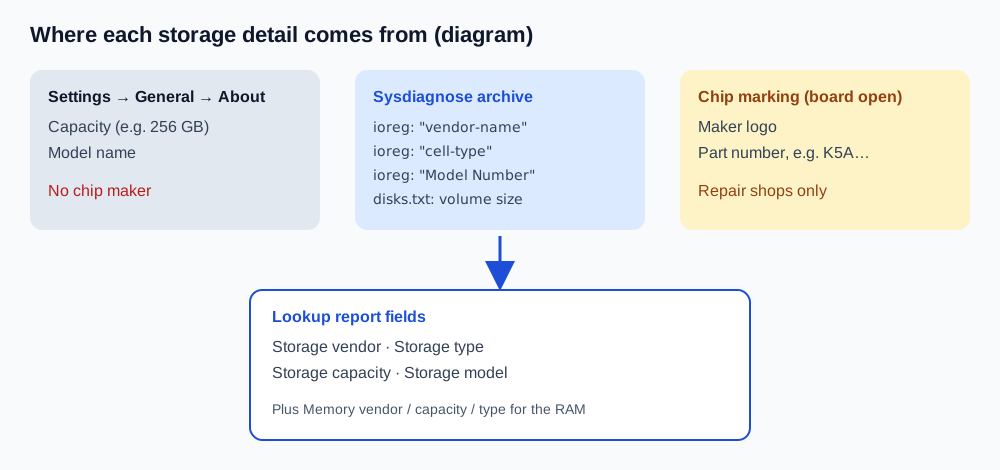
How to read your storage vendor from a sysdiagnose
- Capture a sysdiagnose. Press both volume buttons and the side button together for about a second, then let go and wait about 10 minutes. The full steps are in How to get a sysdiagnose file on iPhone.
- Find the file. Go to Settings → Privacy & Security → Analytics & Improvements → Analytics Data and look for the newest
sysdiagnose_entry. - Import it at /lookup/ in Safari. The archive is unpacked in your browser, and only the extracted configuration fields are sent to build the report.
- Read the storage rows. These are the fields and where each one comes from in the archive:
| Report field | Where it comes from | Example value |
|---|---|---|
| Storage vendor | "vendor-name" in the I/O registry |
Kioxia, Samsung, SK hynix, SanDisk, Micron |
| Storage type | "cell-type" (value 3) |
TLC / 3bit |
| Storage model | "Model Number" or an APPLE SSD … string |
The controller's model code |
| Storage capacity | Volume size in disks.txt, rounded to the nominal size |
256GB |
| Memory vendor / capacity / type | dram-vendor, dram-size, dram-type |
The RAM, a separate chip from the NAND |
If you want to see these files yourself, What's inside an iPhone sysdiagnose log walks through the ioreg/ folder.
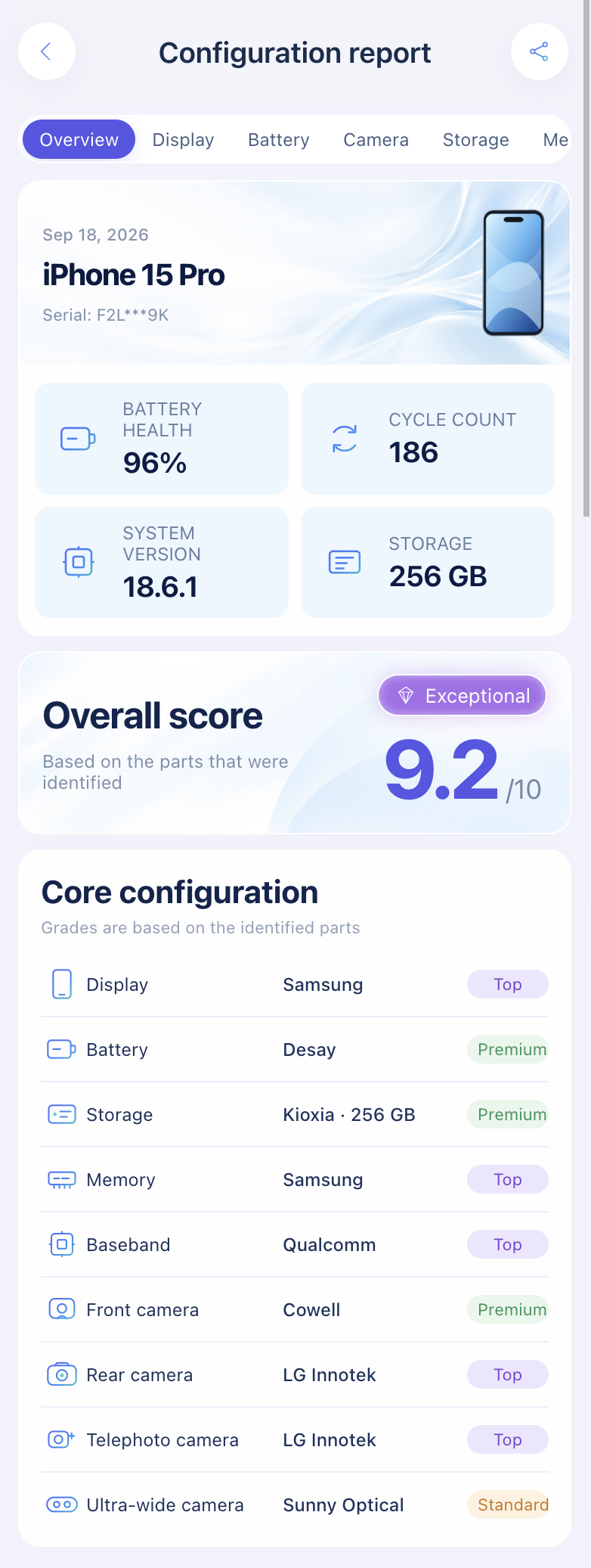
Import a sysdiagnose to see the storage vendor, type and capacity next to the RAM, display, battery, camera and baseband details.
Open the lookup toolHow the report grades storage makers
The report puts a tier label on the storage vendor. Samsung and Kioxia (including chips that report as Toshiba, Kioxia's former name) are marked as top tier. SK hynix, SanDisk/Western Digital and Micron are marked as mainstream. That's this site's own rule, explained on the About page. Apple doesn't publish speed or endurance figures per supplier, and you can't choose a supplier when you buy, so don't treat a "mainstream" label as a defect.
When the storage check is useful
- Buying used. Compare Capacity in Settings with the listing. Third-party shops do sell NAND swaps as storage upgrades, and Apple's Parts and Service History lists battery, display, logic board and cameras, but no separate storage entry. A vendor or capacity that doesn't fit the model is a reason to ask questions.
- Checking the whole phone. Storage is one row in a full parts check. How to check if iPhone parts are original covers the display, battery and cameras too.
- Thinking of a serial lookup. A device serial won't tell you any of this. Here's why.
FAQ
Can I check the NAND maker in iPhone Settings?
No. Settings shows capacity and model, but not the flash supplier. You need a sysdiagnose or a look at the chip itself.
Is Kioxia the same company as Toshiba?
Yes. Toshiba's memory business was renamed Kioxia in 2019, so older reports and tools may still say Toshiba.
Does a Samsung NAND chip make my iPhone faster than a Kioxia one?
There's no public Apple data comparing suppliers in the same model, and Apple sets the storage spec for each model. The tier label in our report is a site convention, not a benchmark.
Is the RAM the same chip as the storage?
No. RAM (DRAM) and storage (NAND) are separate chips, often from different makers. In the iPhone 16 Pro teardown, for example, the RAM was Micron and the NAND was Kioxia.
My report says "Unknown" for storage vendor. Is the chip fake?
Not necessarily. An incomplete archive or an unrecognized vendor string can both produce it. Capture a fresh sysdiagnose and compare the result with Capacity in Settings.
Sources: iFixit chip IDs for the iPhone 13 Pro, iPhone 14 Pro Max, iPhone 15 Pro Max, iPhone 16, iPhone 16 Pro and iPhone 17 Pro. TechInsights: Memory components in your smartphones. Apple Support: iPhone Parts and Service History.
Import a sysdiagnose file to see the display, battery, camera, storage, memory and baseband makers in one report. Lookups use a paid quota.
Open the lookup tool