How to Check an iPhone's IMEI and Serial Number Before Buying
Short answer: Ask the seller for the IMEI and serial number, then read them yourself on the phone by dialing *#06# and opening Settings → General → About. Every copy (screen, SIM tray, box, receipt) must match. Run the IMEI through a blocklist checker such as CTIA's Stolen Phone Checker and the serial through Apple's Check Coverage. Those checks tell you whether the phone is blocked and what model it is. They say nothing about replaced parts, so finish with Parts and Service History and a sysdiagnose lookup.
Before you meet: what to ask for
A genuine seller can send three things in a minute: a screenshot of Settings → General → About showing the model, serial number and IMEI; a photo of the original box label if they still have it; and the receipt or carrier record. A seller who refuses to share the IMEI at all is a red flag. Carriers such as AT&T advise buyers to treat that refusal as a warning sign.
Run the online checks on those numbers before you travel. Just remember that a screenshot proves nothing about the phone you'll be handed, which is why the next two steps happen in person.
Where to find the IMEI and serial number
Apple lists every location in Find the serial number or IMEI. The ones that matter when buying:
| Where | Shows | Works on |
|---|---|---|
| Settings → General → About | Serial, IMEI, EID, model | Any phone you can unlock |
Dial *#06# in the Phone app |
IMEI (both on dual-SIM models) | Any iPhone |
| Hello screen → ⓘ Info button | Serial, IMEI | An erased phone, before setup |
| SIM tray | IMEI | iPhone 6s to iPhone 13, SE (2nd and 3rd gen) |
| Engraved on the back | IMEI | iPhone 5 to iPhone 6 Plus, SE (1st gen) |
| Original box barcode label | Serial, IMEI, EID | Any model, if the box is original |
| Finder (Mac) or Apple Devices app (PC) | Serial, IMEI | Any iPhone over USB |
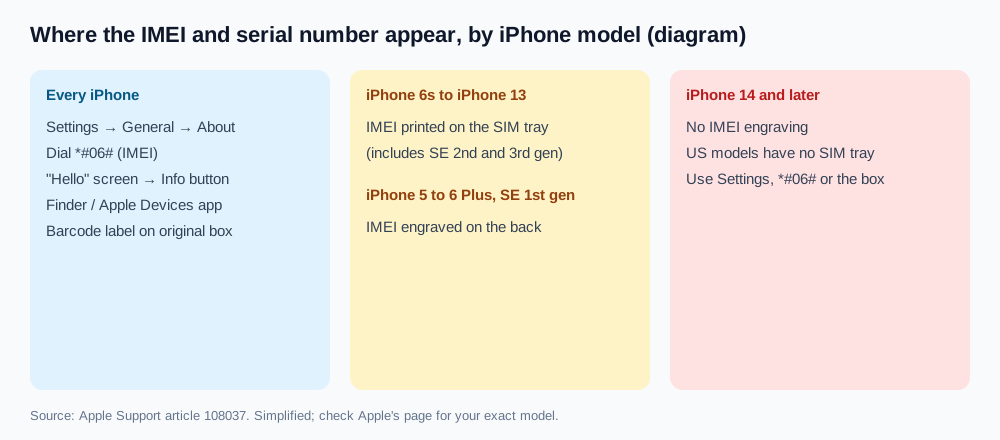
Apple notes that iPhone 14 models and later have no IMEI engraving, and US models from iPhone 14 onward are eSIM-only with no SIM tray. On those phones, Settings, *#06# and the box are your only sources, so check all three.
The Hello screen trick is handy when a seller has already erased the phone: press and hold the side button until the Apple logo appears, wait for "Hello," then tap the Info button in the bottom-right corner.
Make sure every copy matches
This is the step most guides rush, and it's the one that catches swapped phones.
- Settings and
*#06#agree. Both read from the phone itself. Dual-SIM iPhones show two IMEIs; the one the seller sent should be one of them. - SIM tray matches (iPhone 6s to 13). A different IMEI on the tray usually means the tray came from another phone. That alone isn't fatal, but ask why.
- Box label matches. A box with different numbers is just packaging from another phone. Don't let it "prove" the phone is legit.
- Model and storage match the listing. Settings → General → About shows the model name and capacity. If the ad says 256 GB and the phone says 128 GB, trust the phone.
- Receipt matches. If the seller claims to be the original buyer, the serial or IMEI on the receipt should match too.
A quick sanity test: an IMEI is 15 digits, and the last one is a check digit calculated from the first 14 (the Luhn formula). A number with the wrong length, or one that a checker rejects as invalid, was mistyped or made up.
Run the checks
| Check | Enter | Tells you | Doesn't tell you |
|---|---|---|---|
| CTIA Stolen Phone Checker (US) | IMEI | Whether it's on the GSMA Block List as lost, stolen or otherwise blocked | Activation Lock, repairs, unpaid balance on every carrier |
| Your carrier's IMEI or "bring your own phone" check | IMEI | Whether it will activate on that network | Parts, Activation Lock |
| Apple Check Coverage | Serial | That it's a real Apple serial, the model, warranty and AppleCare status | Blocklist status, repairs, part makers |
| Settings → General → About → Carrier Lock | (on the phone) | No SIM restrictions if unlocked | Blocklist status |
| Turning it on and erasing it | (on the phone) | Whether iPhone Locked to Owner appears | Anything about parts |
CTIA warns that a theft report can take 24 hours or more to appear, so a clean result is a snapshot. Outside the US, use your country's equivalent (for example, a carrier association's checker) instead.
Activation Lock is the one thing no IMEI site can settle for you, since Apple doesn't offer a public lookup. Follow Apple's advice in If you want to buy a preowned iPhone: if the phone shows iPhone Locked to Owner, or setup asks for the previous owner's Apple Account, don't buy it.
On the serial side, iPhones from 2021 onward use randomized serial numbers, so you can't decode the factory or build week from the characters anymore. Check Coverage is the reliable way to confirm the model. Our serial number guide explains what else a serial lookup does and doesn't reveal.
What IMEI and serial checks can't tell you
Both numbers identify the phone, not what's inside it. A phone with a clean IMEI and valid warranty can still have a cheap replacement screen or a battery from an unknown supplier. Paid "full IMEI reports" can't see inside the phone either.
For that, check two more things:
- Parts and Service History in Settings → General → About (iOS 15.2 or later) labels replaced parts as Genuine, Used, Unknown or Unverified (Apple Support). We explain each label in what the Genuine and Unknown messages mean.
- Who made the parts. Settings doesn't name the maker. A sysdiagnose holds the display, battery and camera serials plus storage and modem IDs, and our lookup decodes them into maker names. You can then compare the screen with the suppliers Apple used for that model.
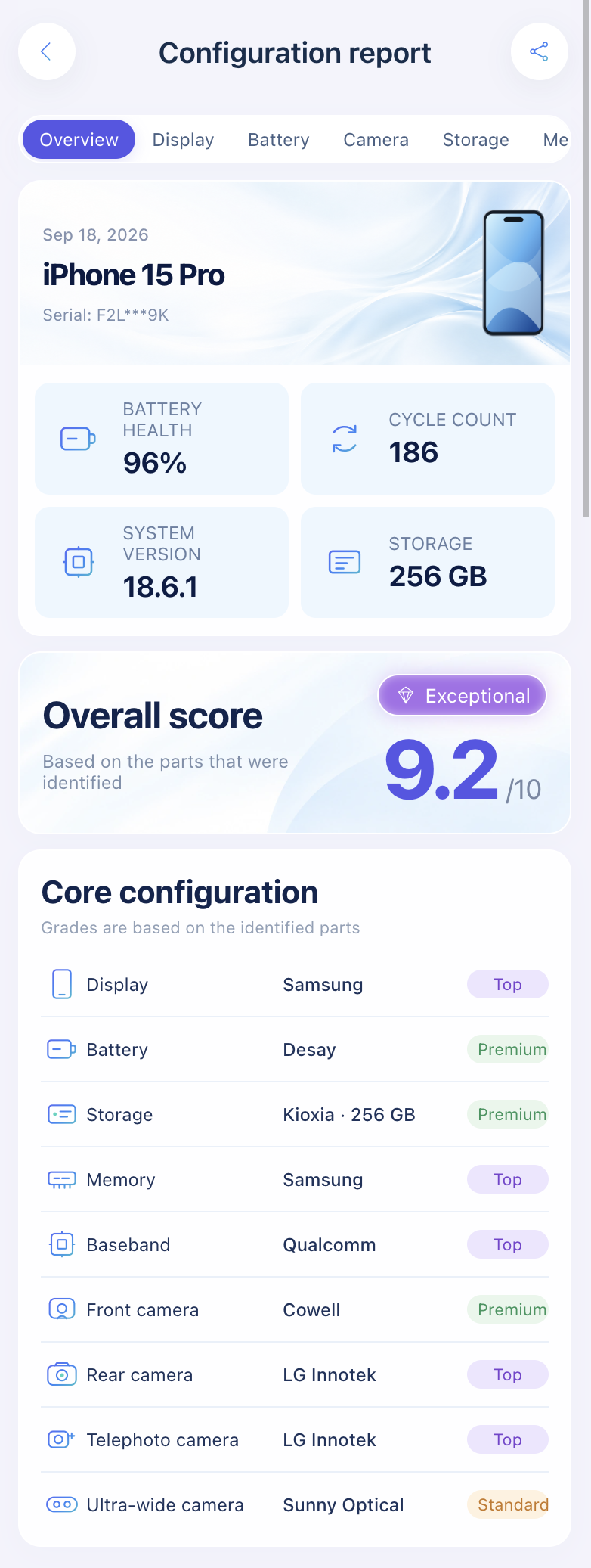
Import a sysdiagnose to see who made the display, battery, cameras, storage, memory and modem before you pay.
Open the lookup toolFor the full on-the-spot routine, use our 15-point used iPhone checklist, and see used iPhone checker tools compared if you want a desktop second opinion.
FAQ
Can I check an iPhone's IMEI before meeting the seller?
Yes. Ask for a screenshot of Settings → General → About and run the blocklist and coverage checks. Then confirm in person that *#06# shows the same number.
Is a clean IMEI check enough to buy?
No. It only covers blocklist status. You still need to rule out Activation Lock, carrier lock and replaced parts.
Why don't the SIM tray and Settings match?
The tray was probably swapped from another phone during a repair or by mistake. Settings and *#06# are what count.
Does the serial number show if the iPhone was repaired?
No. Apple's Check Coverage shows warranty status, not repair or part history. Parts and Service History and a sysdiagnose do.
Sources: Apple Support: Find the serial number or IMEI, If you want to buy a preowned iPhone, iPhone Parts and Service History; CTIA Stolen Phone Checker FAQ; AT&T: Secondary market risks.
Import a sysdiagnose file to see the display, battery, camera, storage, memory and baseband makers in one report. Lookups use a paid quota.
Open the lookup tool