How to Check Your iPhone's Country of Origin from the Model Number
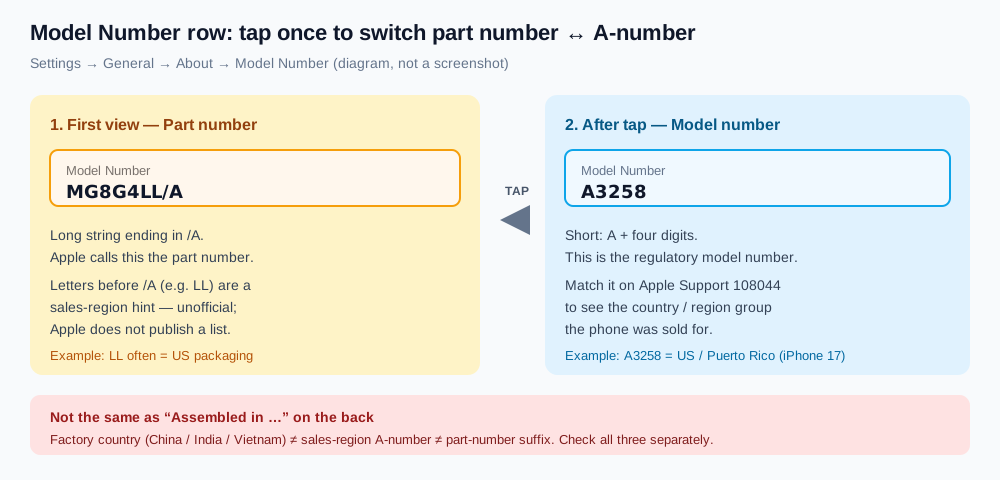
Short answer: Open Settings → General → About, tap the Model Number value once so it flips from the long part number (for example MG8G4LL/A) to the short regulatory model number (for example A3258). Match that A-number on Apple's Identify your iPhone model page. The countries listed there are the sales-region group the phone was configured for—not the factory that assembled it, and not proof that it is unlocked or free of replaced parts.
Three things people mean by "country of origin"
Search results mix three different facts. Separating them early saves a bad purchase.
| What you see | What it actually is | Official source? |
|---|---|---|
| A-number (e.g. A3258) after tapping Model Number | Regulatory model number tied to a country / region sales group | Yes — Apple Support 108044 |
| Part-number suffix (e.g. LL/A, CH/A, J/A) | Intended sales market / packaging / adapter region | No — Apple does not publish a list; community tables change by generation |
| "Assembled in China / India / Vietnam" on the back or regulatory label | Manufacturing country of that unit | Hardware label only — unrelated to the A-number group |
A phone can be assembled in India, sold for the US market (A3258), and packaged with an LL/A part number. Those three facts can all be true at once. Gray-market ads that say "US version" or "Japanese version" usually mean the sales-region A-number or the part-number suffix—not the factory stamp.
How to read the Model Number in Settings
Apple documents the toggle in Find the model number of your iPhone:
- Open Settings → General → About.
- Find the Model Number row. The value on the right is the part number first (a longer string ending in
/A). - Tap that value once. It switches to the short model number: the letter
Afollowed by four digits. - Tap again (or leave and return) to switch back.
Write both down. The A-number is what you look up on Apple's page. The part number is useful as a packaging / region hint, but treat any suffix decoder as unofficial.
If you cannot unlock Settings, Apple also lists where the model number is printed on the hardware: inside the SIM slot on models that still have a tray, or inside the USB-C / Lightning connector on eSIM-only units, and on the back of iPhone 7 and earlier.
Match the A-number on Apple's list
- Open Identify your iPhone model.
- Scroll to the Model Name shown in About (for example iPhone 17 Pro).
- Read the line of model numbers. Each A-number is followed by the countries and regions it ships to.
- Find your A-number. That bracketed list is your phone's sales-region group.
One A-number often spans many countries. A3519 on an iPhone 17, for example, covers Bahrain, Canada, Guam, Japan, Kuwait, Mexico, Oman, Qatar, Saudi Arabia, the UAE and the U.S. Virgin Islands together. The A-number tells you the group, not always a single country.
Recent A-numbers by country group (from Apple Support 108044)
Figures below are taken from Apple's page (published date on that article: October 22, 2026). Always re-check the live page for your exact model—Apple updates the list when new models ship.
| Model | US / Puerto Rico | Canada, Japan, Gulf & similar group | China mainland | Other countries / regions |
|---|---|---|---|---|
| iPhone 17 | A3258 | A3519 (Bahrain, Canada, Guam, Japan, Kuwait, Mexico, Oman, Qatar, Saudi Arabia, UAE, USVI) | A3521 | A3520 |
| iPhone 17 Pro | A3256 | A3522 (same group as above) | A3524 | A3523 |
| iPhone 17 Pro Max | A3257 | A3525 (same group as above) | A3527 | A3526 |
| iPhone 16 | A3081 | A3286 (Bahrain, Canada, Iraq, Guam, Japan, Jordan, Kuwait, Mexico, Oman, Qatar, Saudi Arabia, UAE, USVI) | A3288 (China mainland, Hong Kong, Macao) | A3287 |
| iPhone 16 Pro | A3083 | A3292 (same group as iPhone 16 above) | A3294 (China mainland, Hong Kong, Macao) | A3293 |
Note the China row sometimes includes Hong Kong and Macao (iPhone 16 family) and sometimes lists China mainland alone (iPhone 17 family). That is why you match against the entry for your model, not a generic chart.
Part-number region suffixes (unofficial)
The first view of Model Number shows a part number such as MG8G4LL/A. Community tables treat the letters before /A as a sales-region code. Apple does not publish an official mapping, and codes can shift between generations, so treat the following as a compiled guide—not a guarantee:
| Suffix (examples often cited) | Commonly associated market | Caveat |
|---|---|---|
| LL/A | United States | Packaging / adapter region; not an unlock status |
| CH/A | Mainland China | Often dual physical nano-SIM on supported models |
| J/A | Japan | Japanese units historically keep the camera shutter sound |
| HN/A | India | Local warranty expectations vary |
| ZP/A | Historically Hong Kong / Macau | Confirm against your generation |
| B/A or QN/A | UK (varies by generation) | Codes change; do not invent new ones |
| ZD/A | Parts of Europe (varies) | Multi-country EU packaging is common |
| X/A | Australia / New Zealand (often cited) | Confirm for your model year |
| ZA/A | Varies by generation | Do not assume a single country |
If the A-number and the suffix seem to disagree with the seller's story, trust the A-number on Apple's page first, then ask why the packaging code looks different (refurbished tray, swapped box, gray import, etc.).
Dual-SIM, eSIM and why gray-market buyers care
Apple's model details on the same Support page note which markets ship without a SIM tray. For recent flagships:
- United States (and, on many 17-series units, Puerto Rico plus a Canada / Japan / Gulf group): eSIM only — no physical SIM tray.
- China mainland (many models): dual physical nano-SIM; eSIM availability depends on the model and year.
- Other countries / regions: usually one nano-SIM tray plus eSIM on supported models.
That is the practical reason gray-market buyers check the A-number before paying. A US-spec iPhone 17 (A3258) will not take a physical SIM card. A China-mainland unit may expect two physical SIMs. Warranty service is also typically handled in the region of purchase. Region does not, however, equal carrier-unlocked: open Settings → General → About → Carrier Lock (or check with the carrier) for that.
What region cannot tell you
Matching an A-number answers one question: which sales-region group Apple built that regulatory model for. It does not answer:
- Stolen / blocked status — run the IMEI through a blocklist checker. See how to check IMEI and serial before buying.
- Activation Lock — only turning the phone on (or starting setup) shows iPhone Locked to Owner.
- Replaced parts — open Settings → General → About → Parts and Service History, and see what Genuine / Unknown messages mean plus how to check if parts are original.
- Who made the display, battery, cameras, storage or modem — a serial lookup will not name makers either (serial number guide); a sysdiagnose does.
- Factory country — read the "Assembled in …" line on the back or regulatory label separately.
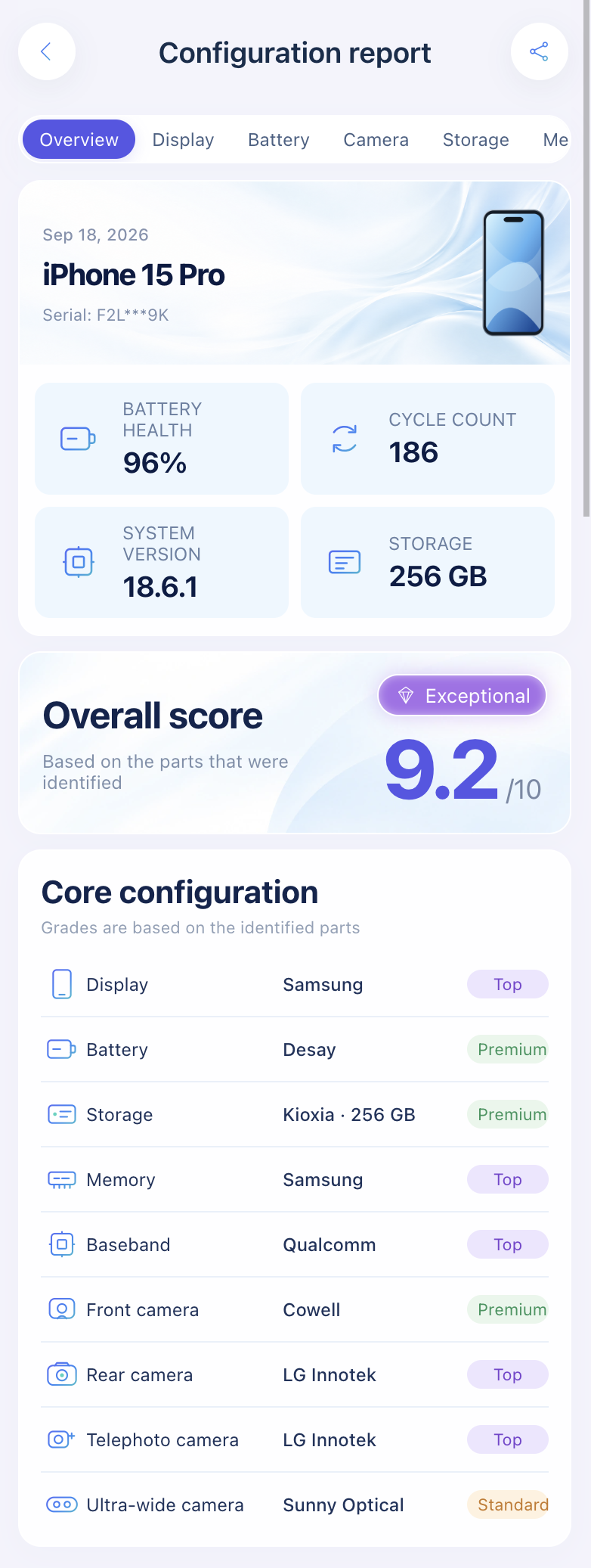
Import a sysdiagnose to see who made the display, battery, cameras, storage, memory and modem before you pay.
Open the lookup toolFor the full buying routine, use the 15-point used iPhone checklist.
FAQ
Is the A-number the same as the country printed on the box?
Usually they agree for new retail stock, but the A-number is the verifiable source. A mismatched box can be leftover packaging from another phone.
Does "Assembled in India" mean it is an Indian market phone?
No. Assembly country and sales-region A-number are independent. Match the A-number on Apple's list for the market group.
Can I change an iPhone's country / region by changing the Settings language?
No. Language and Region in Settings do not rewrite the regulatory model number or the part-number suffix.
Will a Japan (J/A) iPhone work on my US carrier?
Often yes if it is unlocked and the bands match, but confirm Carrier Lock, eSIM vs SIM tray, and warranty coverage in your country before you buy. Japanese units are also known for a non-mutable camera shutter sound.
Does the model number show replaced parts?
No. Use Parts and Service History and a sysdiagnose lookup for that.
Sources: Apple Support: Identify your iPhone model, Find the model number of your iPhone, iPad, or iPod touch, Find the serial number or IMEI, If you want to buy a preowned iPhone. Part-number suffix examples above are community-compiled and unofficial—Apple does not publish a region-code list.
Import a sysdiagnose file to see the display, battery, camera, storage, memory and baseband makers in one report. Lookups use a paid quota.
Open the lookup tool